
Shopify Bot Traffic Is More Than Just Fake Visits: Here’s How to Filter It Out

A Shopify store can look busy on paper while barely selling anything in reality. Shopify bot traffic can drive up sessions, inflate traffic numbers, and make a store appear more active than it really is. Revenue may stay flat even as traffic climbs.
| What you’ll learn in this article: ● What Is Shopify Bot Traffic and Why Does It Matter? ● How to Tell If Your Shopify Store Has Bot TrafficWhat Types of Bots Attack Shopify Stores? ● How to Stop Bots on ShopifyHow to Prevent Shopify Bot Traffic Without Blocking Real Customersư |
What Is Shopify Bot Traffic and Why Does It Matter?
Shopify bot traffic refers to any automated visitor that interacts with a store instead of a real shopper. A bot loads pages, clicks links, fills out forms, or even adds items to cart, but no human sits behind the screen.
Real shoppers browse, hesitate, compare, and eventually convert or leave. Bots follow scripts, and they do it thousands of times faster than any person could.
Not every bot causes harm. Store owners generally deal with two categories:
- Good bots: search engine crawlers like Googlebot, legitimate uptime monitors, and AI crawlers that index content for tools like ChatGPT or Perplexity.
- Bad bots: scrapers, spam bots, fraud bots, checkout bots, and any automated script built to manipulate traffic, inventory, or transactions.
The gap between the two categories gets harder to see every year. Modern bots run on residential proxies, rotate IP addresses, and mimic human mouse movement and scroll behavior closely enough to slip past basic detection.
Imperva’s 2025 Bad Bot Report found that automated traffic overtook human traffic across the internet for the first time in a decade, with bad bots alone accounting for 37% of all web traffic.
How to Tell If Your Shopify Store Has Bot Traffic
A few warning signs tend to show up before merchants confirm the cause. Store owners should watch for:
- Sudden traffic spikes with no matching increase in sales
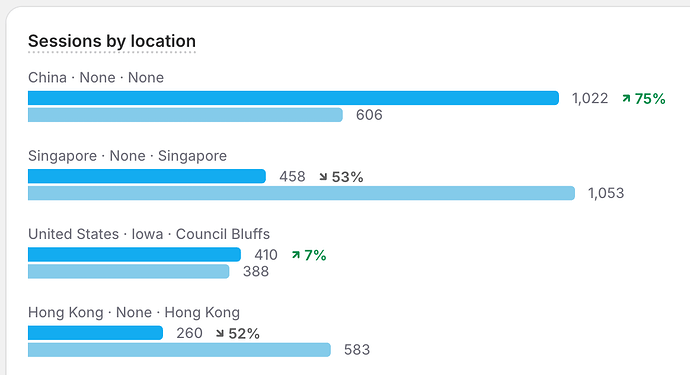
- Large volumes of sessions from unexpected countries or regions with no ad or marketing presence there
- Extremely short sessions or near-zero engagement time across a large share of visits
- Repeated visits from similar devices, IP ranges, or hosting and datacenter providers
- Unusual spikes in add-to-cart events, abandoned checkouts, failed payment attempts, or account and form submissions
- Traffic patterns that repeat at a speed or volume no human could reproduce
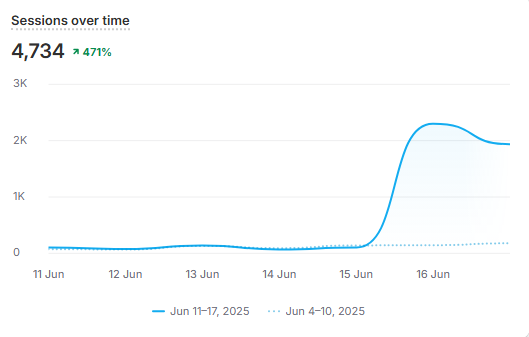
A high bounce rate alone does not prove bot activity. Real visitors bounce too, especially on landing pages built for a single call to action. Bounce rate only becomes a useful signal once it pairs with other patterns, such as zero scroll depth, identical session duration across thousands of visits, or traffic concentrated in a narrow time window.
A practical way to confirm suspicious activity involves comparing Shopify Analytics against GA4 or another independent traffic source:
- Pull total sessions from Shopify Analytics for the same date range as GA4
- Compare the gap between the two, since a large mismatch often points to traffic that one platform filters and the other does not
- Check GA4’s Traffic Acquisition report for spikes in direct or unlabeled referral traffic, since many bots skip referrer headers entirely
- Cross-reference abandoned checkout timestamps against session spikes to see whether fake checkouts cluster around the same windows as suspicious sessions
What Types of Bots Attack Shopify Stores?
Not every bot attack pursues the same goal, so the right prevention method depends heavily on what the bot actually does once it lands on a store.
A rate limit that stops a checkout bot will not slow down a scraper, and a CAPTCHA that blocks a fake account signup does nothing against a bot that never touches a form.
Analytics and Spam Bots
These bots generate fake visits and events without any intent to purchase. They pollute Shopify Analytics, GA4, attribution reports, and marketing dashboards.
Once enough fake sessions accumulate, traffic and conversion patterns stop reflecting reality, and decisions based on that data start pointing in the wrong direction.
Scraper Bots
Scraper bots crawl product pages, prices, inventory levels, and other store content, often to feed a competitor’s pricing tool, a resale operation, or an AI training dataset.
Beyond the data theft itself, aggressive scraping increases server load and resource usage, which can slow the store down for real customers during peak traffic.
Cart and Checkout Bots
These bots add products to carts repeatedly, sometimes to reserve limited-stock inventory before real shoppers can buy it, and sometimes just to generate noise.
The result shows up as a wave of fake abandoned checkouts, which throws off both conversion metrics and remarketing lists built from cart abandonment.
Fraud and Card-Testing Bots
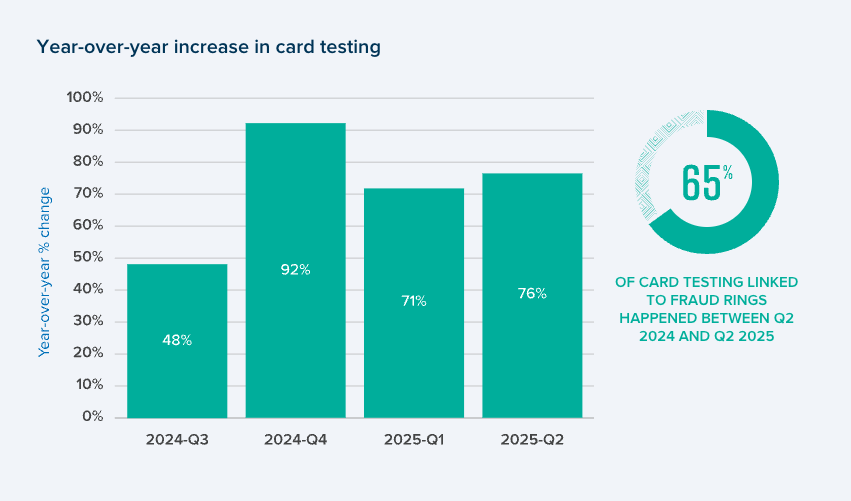
Card-testing bots run stolen payment details through a checkout in rapid succession to find which cards still work. Signifyd’s fraud data shows card testing attacks rose 65% between Q2 2024 and Q2 2025 alone.
Each attempt generates a failed transaction, and the volume alone can push a merchant’s decline rate high enough to trigger scrutiny from payment processors.
Ad and Referral Spam Bots
These bots arrive through paid campaigns or manipulated referral sources, inflating click counts on ads without producing real revenue. Google Ads and Meta both invest heavily in click fraud detection, but enough invalid traffic still slips through to waste a meaningful budget, especially on smaller accounts with lower daily spend.
Attacks frequently overlap in practice. One bot might scrape a product catalog while simultaneously generating fake sessions and fake cart activity in the same visit. Shopify merchants have reported exactly this pattern on the platform’s own community forums, describing large volumes of sessions paired with repeated fake abandoned checkouts using the same fabricated address details.
How to Stop Bots on Shopify?
Merchants stop the most damage when they detect and block malicious traffic as early as possible.
1. Use Shopify’s Built-In Bot and Fraud Protection
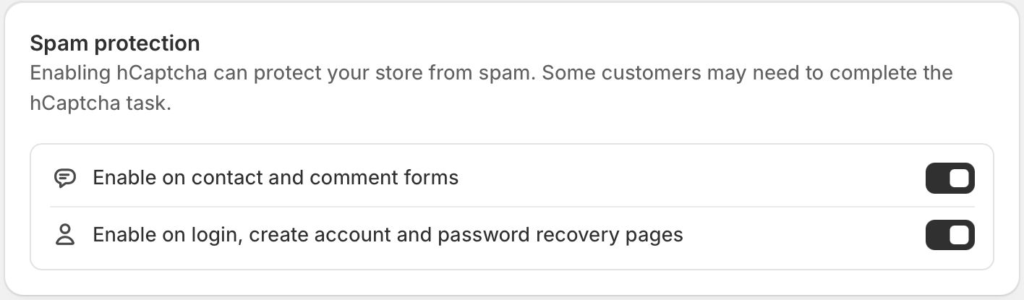
Shopify’s native “Human or bot session” filter cleans up analytics and reporting, giving merchants a clearer view of real customer behavior. On the security side, Shopify also runs Cloudflare for web application firewall and DDoS protection, along with hCaptcha to block some bots before they reach checkout and account forms.
Analytics filtering cleans up reporting, but it does not necessarily prevent a bot from reaching the storefront in the first place. Merchants who rely on filtering alone often still see inflated sessions, fake cart activity, and scraping continue in the background, even though their reports look cleaner.
2. Add CAPTCHA or Challenge-Based Protection
CAPTCHA works best on high-risk actions: account creation, login, newsletter signup, and any custom form exposed to the public. A challenge placed at these specific points blocks a large share of simple bots without touching the browsing experience.
Site-wide CAPTCHA, on the other hand, tends to backfire. A challenge screen forced on every visitor before they can browse products adds friction that measurably hurts conversion rates, and legitimate shoppers abandon sessions over a hurdle that was never meant for them.
3. Block Suspicious IPs, Regions, and Request Patterns
Merchants can block known malicious IPs or IP ranges once a pattern becomes clear, and rate limiting helps contain any single source sending an excessive number of requests in a short window.
Geographic blocking can work too, but only when the traffic in question has no legitimate business value, since blocking an entire country also blocks any real customers, affiliates, or partners located there.
IP-based blocking has a real limitation: bots rotate IPs constantly and route traffic through residential or datacenter proxies specifically to avoid this kind of filter. A blocklist built today may already be outdated by the time a merchant reviews it next week, which is why IP blocking works best as one layer among several rather than a standalone solution.
4. Use Dedicated Bot Protection or a WAF
A dedicated Shopify bot protection app makes sense for merchants dealing with persistent, sophisticated bot activity that native tools cannot fully address, especially fraud rings or scraping operations targeting a specific store.
Edge or network-level protection, such as a web application firewall, fits better for merchants facing high-volume attacks, DDoS attempts, or API-targeted abuse that needs to be stopped before it ever reaches Shopify’s infrastructure.
Strong bot protection tools typically evaluate several signals together:
- Request velocity and timing patterns
- Traffic originating from known datacenter or hosting IP ranges
- Headless browser fingerprints
- Behavioral anomalies like impossible navigation speed or missing mouse movement
5. Protect Analytics and Tracking From Bot Pollution
A blocked bot and a bot that never gets the chance to contaminate stored data represent two separate problems. A bot that gets blocked after it has already fired a pageview, an add-to-cart event, or a conversion pixel has already done damage to the numbers, even if it never reaches checkout.
For that reason, protecting tracking and consent touchpoints needs to happen before a bot can generate a fake signal, not after.
Server-side tracking, bot-aware tag configurations, and pre-checkout validation all help stop bad data from entering GA4, Shopify Analytics, and ad platforms in the first place.
How Can Blockify Help Stop Shopify Bot Traffic?
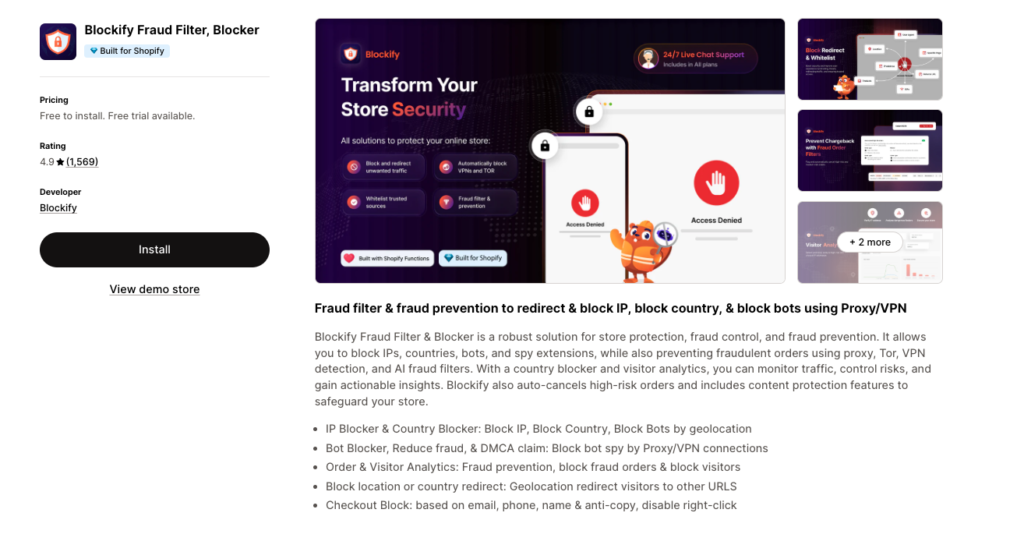
For stores dealing with persistent Shopify bot traffic, Blockify Fraud Filter & Blocker adds a dedicated layer of protection for identifying and blocking unwanted visitors. The app can detect bots and suspicious traffic associated with proxies or VPNs, while also giving merchants tools to block specific IP addresses or locations.
This makes Blockify Fraud Filter useful when basic IP blocking is no longer enough. Merchants can monitor visitor activity, identify suspicious patterns, and apply targeted blocking rules without automatically restricting every visitor to the store.
For Shopify stores dealing with recurring bot visits, scraping, or other suspicious activity, adding Blockify Fraud Filter alongside Shopify’s built-in protections can help reduce unwanted traffic while keeping legitimate shoppers accessible.
How to Prevent Shopify Bot Traffic Without Blocking Real Customers
Aggressive blocking creates its own risk. A rule built too broadly can catch legitimate crawlers that support SEO rankings, price comparison tools that drive real customers, or shoppers on unusual networks like corporate VPNs. Once that happens, the fix causes more damage than the bot ever did.
A few principles reduce that risk significantly:
- Build detection rules around behavior patterns, not solely around country or IP address
- Monitor traffic and conversion numbers closely after implementing any new rule, to confirm legitimate sessions are not dropping alongside the bot traffic
- Review bot patterns on a regular basis, since attackers rotate IPs, spoof user agents, and adjust browsing behavior specifically to evade existing rules
- Layer multiple defenses instead of relying on one method alone:
- Shopify’s native human/bot filtering
- Dedicated bot detection tools
- A WAF or rate limiting at the network edge
- CAPTCHA on high-risk actions only
- Ongoing analytics monitoring
Conclusion
Shopify bot traffic touches nearly every part of a store’s operation. Merchants who treat all bot traffic the same way usually end up either under-protected or overly aggressive, blocking real customers along with the automated threat.
Above all, filtering bot traffic out of reports and actually preventing malicious bots from interacting with the store solve two different problems. Clean reporting helps merchants make better decisions with the data they already have.
