
AI Writes Your Regex Rules | Blockify Fraud Filter


Blocking unwanted bots, AI scrapers, and competitors by User-Agent has always required writing regular expressions (regex). For most store owners, regex is complex and error-prone. Copying snippets from online forums often leads to poorly scoped patterns – and when a rule is even slightly too wide, it quietly blocks legitimate shoppers, resulting in untracked lost revenue.
Blockify Fraud Filter eliminates that technical friction. With our new Generate with AI feature, you no longer need regex expertise to set up advanced User-Agent rules. Simply describe the traffic you want to manage in plain English, test the pattern against real data, and deploy it with confidence.
What’s New: AI-Powered User-Agent Regex Generation
Configuring User-Agent rules across your Block, Redirect, and Whitelist workflows is now as simple as typing a sentence. The new generator translates your plain-language descriptions into precise syntax instantly.
- Describe in Plain English: Enter the exact traffic you want to filter (e.g., “Block AI crawlers like GPTBot and ClaudeBot” or “Allow Googlebot and Bingbot“). Blockify builds the regex pattern and provides a one-line summary explaining exactly what it targets.
- Built-in Rule Testing: Before applying any rule, paste a real User-Agent string into the test field to see an immediate Matched (green) or Not matched status. The tool also provides pre-matched sample user agents so you can verify behavior immediately.
- False-Positive Warnings: If an AI-generated pattern is broad enough to risk catching genuine buyers, Blockify displays an upfront warning so you can adjust before saving.
- Instant Refinement & Manual Override: If the output does not match your intent, click Regenerate to refine your prompt. Once inserted, the pattern remains fully editable by hand.
Why This Matters for Your Shopify Store
Managing store traffic should protect your bottom line, not add operational headaches or create checkout barriers for real shoppers.
Zero Lost Sales from Bad Syntax: A malformed regex rule can silently turn paying customers away. Instant visual testing and proactive broad-pattern warnings ensure your rules block unwanted traffic without impacting your conversion rate.
Hours Saved on Technical Troubleshooting: Store operators and marketers can implement advanced bot restrictions in seconds without waiting for a developer, consulting technical documentation, or guessing syntax.
How to Get Started in Blockify
You can access the AI generator directly inside your Blockify Fraud Filter admin across the Block, Redirect, and Whitelist tabs.
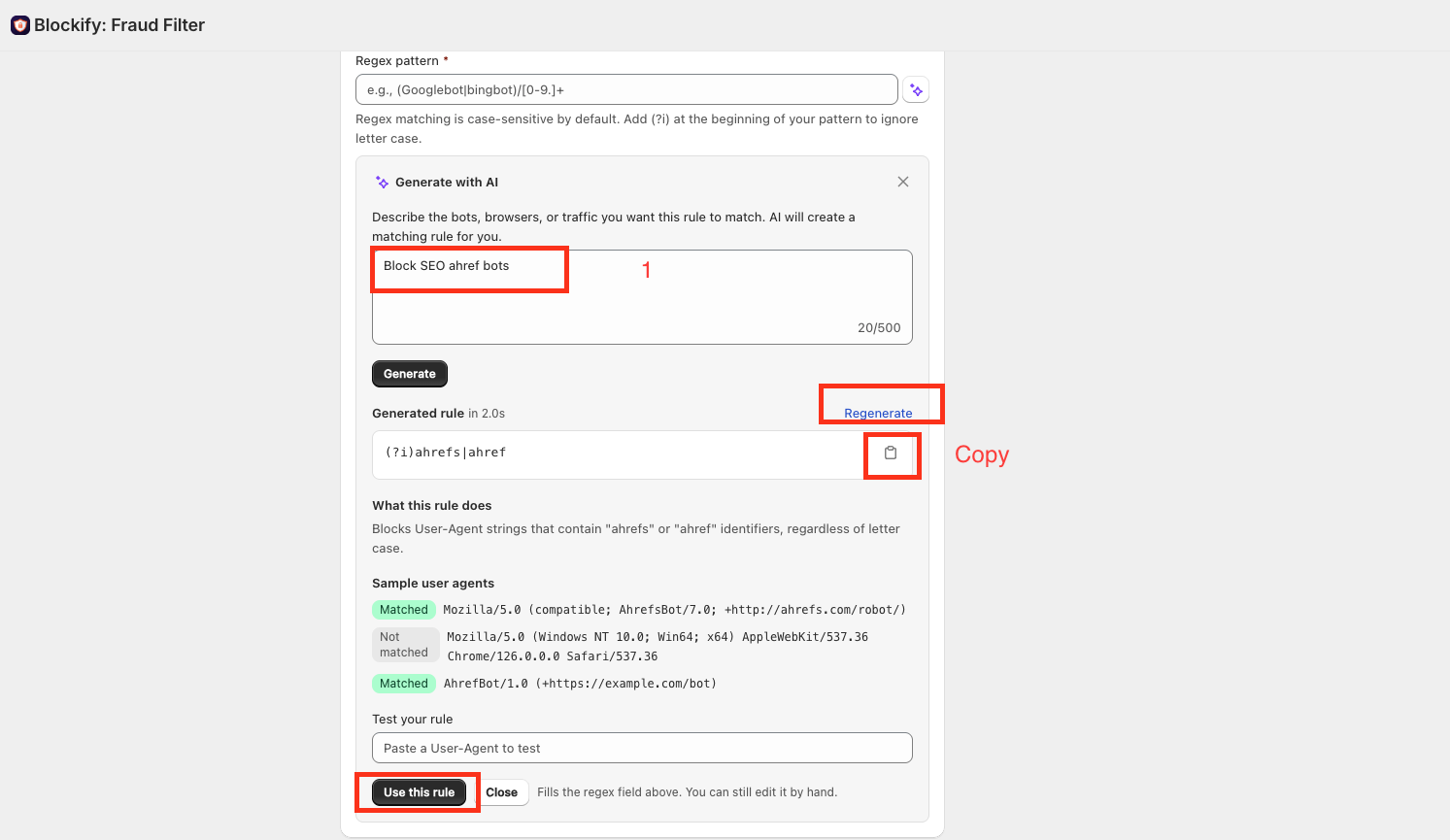
Select Rule Type: Navigate to the Block user agent rule, choose Regex as the Type, and click the Generate with AI (✨) icon next to the pattern field.
Describe Your Traffic: In the prompt panel, enter your desired rule using an action word aligned with your active tab:
- Block tab: Start with Block, Stop, Prevent, or Deny (e.g., “Block SEO ahref bots”).
- Redirect tab: Start with Redirect, Route, or Forward (e.g., “Redirect all AI crawlers to homepage”).
- Whitelist tab: Start with Allow, Permit, or Whitelist (e.g., “Allow Googlebot and Bingbot”).
Review, Test, and Apply: Click Generate to inspect the pattern and explanation. Test against sample strings or custom User-Agents. When satisfied, click Use this rule to insert the pattern into your rule settings and save.
Availability & Daily Limits
Generate with AI is available on all paid plans (Premium, Enterprise, and Shopify Plus). Each store receives up to 10 AI generations per day, resetting 24 hours after your first daily generation. Hand-typed regex patterns remain available across all plans with no changes to existing workflows.
Ready to protect your store without the syntax headache? Open Blockify Fraud Filter and build your first AI regex rule today.
