
What Is a Bot Attack? Meaning, Types, and How to Prevent It

Bots power much of the modern internet. They help search engines discover and index web pages, while businesses use them to automate routine tasks and monitor their services. But the same technology can also be turned against websites. Attackers use automated programs to abuse websites, applications, and APIs on a scale that would be impossible for a human to achieve.
| What you’ll learn in this article: ● What Is a Bot Attack? ● How Do Bot Attacks Affect a Website? ● How to Tell If Your Website Is Under a Bot Attack? ● How to Prevent Bot Attacks? |
What Is a Bot Attack?
A bot attack is any malicious activity carried out by automated software instead of a human user. The bot sends requests, fills forms, scans pages, or attempts logins on its own, following a script written to achieve a specific goal, such as stealing data, disrupting a service, or gaining unauthorized access.
Not every bot deserves suspicion. Three categories matter here:
- Bots are simply automated programs that perform repetitive online tasks without human input.
- Good bots serve a legitimate purpose. Search engine crawlers, uptime monitors, and price-comparison tools fall into this group, and most website owners want them around.
- Malicious bots exist to cause harm. They scrape content without permission, hijack accounts, or flood systems with traffic.
What Are the Most Common Types of Bot Attacks?
Bot attacks take several forms, and most fall into a handful of recognizable categories.
Credential Stuffing and Account Takeover
Attackers feed bots massive lists of usernames and passwords leaked from previous data breaches, then let the bots test those combinations against login pages.
Because so many people reuse passwords across services, a fraction of attempts succeed, handing the attacker control of real accounts.
Brute-Force Attacks
Rather than relying on stolen credentials, brute-force bots guess passwords, PINs, or security answers through sheer repetition. They cycle through character combinations or common password lists until one grants access.
Web and Content Scraping
Scraper bots copy website content, product listings, pricing data, or proprietary text without authorization. Competitors often use scraped pricing to undercut a business in real time, while content thieves republish stolen material elsewhere.
DoS and DDoS Attacks
Denial-of-service bots flood a server or application with an overwhelming volume of requests. When the traffic comes from many distributed sources at once, the attack becomes a distributed denial-of-service, or DDoS, event that can knock a service offline entirely.
Inventory Hoarding and Scalping
Bots built for scalping snap up limited-stock products, concert tickets, or reservation slots within seconds of release. Real customers get shut out, and the attacker resells the inventory at inflated prices.
Spam and Fake Account Creation
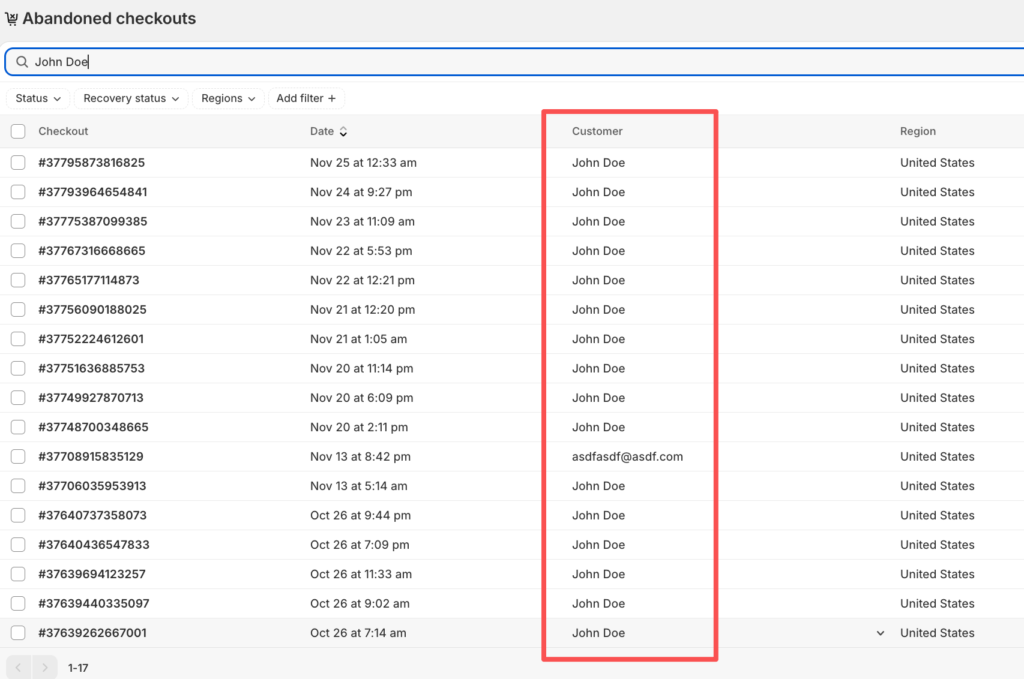
Automated scripts submit spam through contact forms, comment sections, and reviews, or they register large numbers of fake accounts to abuse referral programs, distort engagement metrics, or spread fraudulent content.
Click Fraud
Click-fraud bots repeatedly click on paid ads to drain a competitor’s advertising budget or to generate fraudulent revenue for a publisher, and the practice quietly distorts campaign performance data along the way.
These categories overlap in practice, so a single campaign often combines several techniques at once rather than sticking to one method.
How Do Bot Attacks Affect a Website?
The consequences of a bot attack on website performance reach well beyond a temporary spike in traffic. Businesses feel the impact across technical, financial, and reputational fronts.
- Website slowdowns and downtime: excessive bot requests consume server capacity, and pages load slower or crash entirely for real visitors.
- Increased server and bandwidth costs: infrastructure scales up to absorb fake traffic, and the bill grows without any corresponding revenue.
- Account compromise and stolen data: successful credential stuffing or brute-force attempts hand attackers access to sensitive customer information.
- Content and price scraping: competitors or aggregators lift proprietary data and undercut pricing strategies within hours.
- Fake accounts and spam: marketing metrics become unreliable once bots inflate signups, reviews, or engagement numbers.
- Lost sales and revenue: scalping bots and inventory hoarding push away paying customers who cannot complete a purchase.
- Poor user experience: slow load times, unavailable stock, and locked accounts frustrate legitimate users and drive them elsewhere.
- Ad fraud and distorted analytics: click fraud wastes advertising budgets and skews the data teams rely on to make decisions.
- Increased security risks: every successful bot intrusion often opens the door to further attacks, since compromised accounts and exposed vulnerabilities rarely stay isolated incidents.
Automated traffic already accounted for more than 53% of all global web traffic in 2025, while malicious bots alone made up 40% of all web traffic, according to the 2026 Thales Bad Bot Report published by Imperva. That scale explains why even a mid-sized business can absorb real financial damage once a bot campaign targets its site.
How to Tell If Your Website Is Under a Bot Attack?
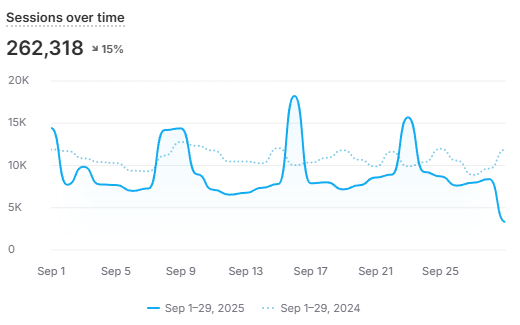
Website owners rarely need specialized tools to spot the first warning signs. Several practical indicators point toward automated abuse:
- A sudden, unexplained spike in traffic or server requests
- Unusual traffic concentrated around specific IP addresses, regions, or ASNs
- Request frequency far higher than any human could generate manually
- Repeated login attempts or password-reset requests against the same accounts
- Failed login rates climbing well above the normal baseline
- Scraping patterns hitting the same pages or API endpoints in rapid succession
- Strange or inconsistent user-agent and browser fingerprint combinations
- Sudden bursts of checkout, signup, or inventory-reservation activity
- Server resource usage climbing without a matching increase in genuine human visitors
High traffic alone never proves a bot attack is underway. Legitimate search engine crawlers, seasonal marketing campaigns, and viral content can all generate traffic spikes that look similar on the surface. Distinguishing real threats from these false positives requires looking at behavior patterns together, not any single metric in isolation.
How to Prevent Bot Attacks?
Effective bot attack prevention combines several layers of defense rather than relying on one tool to catch everything.
Use a Web Application Firewall (WAF)
A WAF inspects incoming traffic and filters out malicious requests before they ever reach the application, blocking known attack signatures and suspicious patterns in real time.
Implement Rate Limiting
Rate limiting caps how many requests a single user, IP address, account, or API endpoint can make within a given timeframe, which stops brute-force and scraping attempts from running at full speed.
Use Bot Detection and Bot Management
Modern bot management platforms combine several techniques to separate humans from automation:
- Behavioral analysis that flags non-human interaction patterns
- Device and browser fingerprinting to catch spoofed identities
- Machine learning models trained to recognize evolving bot signatures
- Traffic and request analysis that spots anomalies across sessions
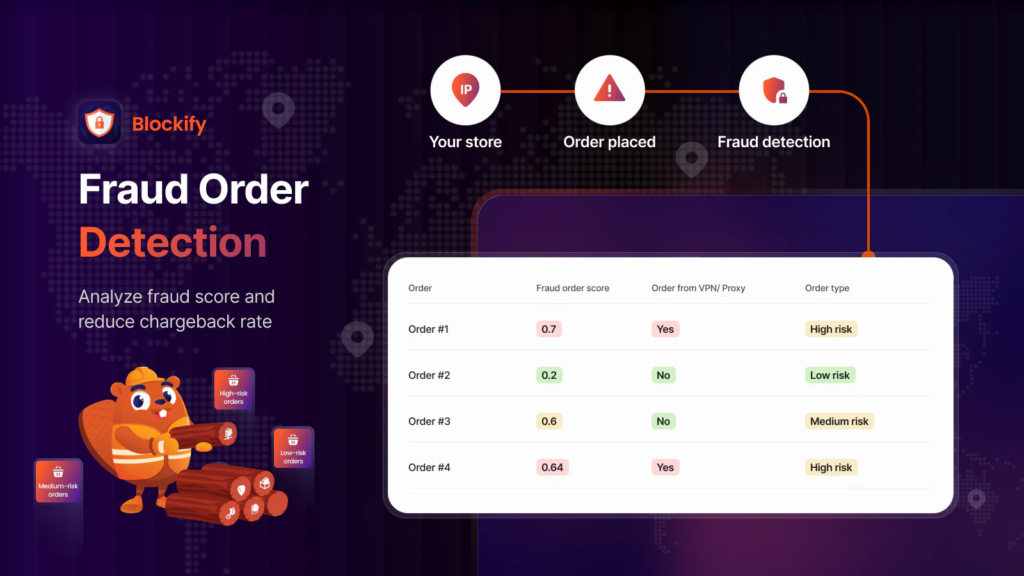
Setting up these layers manually takes time, and most teams do not have a dedicated security engineer available around the clock. Apps like Blockify Fraud Filter handle this detection work automatically, scoring incoming traffic in real time and helping prevent bots from reaching login pages, checkout flows, or APIs by blocking traffic based on IP, country, ISP, or proxy/VPN, so the team only reviews genuine edge cases instead of every request.
Add CAPTCHA or Progressive Challenges
Rather than challenging every single visitor, sites get better results by triggering CAPTCHAs or step-up verification only when traffic already looks suspicious, which keeps friction away from genuine customers.
Strengthen Account Security
Account-level defenses reduce the payoff of credential stuffing and brute-force attacks:
- Multi-factor authentication (MFA) blocks access even when a password leaks
- Strong password policies reduce how many accounts share weak or reused credentials
- Login attempt limits lock out automated guessing after a set number of failures
Use Allowlisting and Blocklisting
Trusted bots and partner integrations belong on an allowlist so they can keep operating without interruption, while known malicious IPs and sources belong on a blocklist that stops them at the door.
Monitor Traffic and Set Alerts
Establishing a clear baseline for normal traffic makes anomalies easier to spot. Continuous monitoring of request volume, login behavior, and API activity lets teams catch an attack early, before it escalates into a full outage or data breach.
According to the FBI’s 2025 Internet Crime Complaint Center (IC3) Annual Report, reported losses from internet-enabled crime surpassed $20 billion in 2025. The FBI also continued to warn about account takeover (ATO), highlighting the need for strong account-security measures alongside network-level defenses.
Bot prevention works best when it targets behavior, not automation itself. Search engine crawlers, uptime monitors, and partner integrations still need reliable access to function properly, so blocking every bot indiscriminately would break parts of the business that depend on legitimate automation. The goal is identifying which bots help and which ones harm, then treating each accordingly.
Frequently Asked Questions About Bot Attacks
What is the difference between a bot attack and a DDoS attack?
A DDoS attack is one specific type of bot attack. It focuses on overwhelming a server with traffic until the service goes down. Bot attacks cover a much wider range of goals, including credential theft, scraping, and fraud, so every DDoS attack qualifies as a bot attack, but not every bot attack is a DDoS.
Can a bot attack take down a website?
Yes. A large-scale DDoS attack or an aggressive scraping campaign can consume enough server resources to slow a site to a crawl or knock it offline entirely, especially when the business has not scaled its infrastructure to absorb sudden traffic surges.
How do I know if website traffic is from bots?
Traffic analytics tools and bot management platforms can separate automated requests from genuine visitors by examining behavior patterns, request timing, IP reputation, and device fingerprints.
Can you completely prevent bot attacks?
No single defense eliminates bot attacks entirely, since attackers constantly adapt their techniques to bypass new protections. Layered defenses, including a WAF, rate limiting, bot management, and strong account security, reduce risk substantially even though they cannot guarantee complete immunity.
Are all bots harmful?
No. Search engine crawlers, monitoring services, and many API integrations rely on bots to function, and businesses generally want that traffic to keep flowing. Only bots built or repurposed for malicious goals, such as scraping, fraud, or account takeover, count as a genuine threat.
Conclusion
Bot attacks now sit among the most common threats any website faces, and the scale keeps growing as attackers automate more of their playbook. Recognizing the difference between a helpful crawler and a malicious script gives a business the first line of defense, while watching for the warning signs covered above catches an attack before it causes lasting damage.
No single tool solves the problem alone. For online stores that want this protection running without building it from scratch, an app like Blockify Fraud Filter & Blocker brings bot detection, IP/country blocking, and fraud-pattern analysis into one system, so the storefront stays open to real customers and closed to automated abuse.
