
Introducing Validation Analytics & AI Rule Suggestions

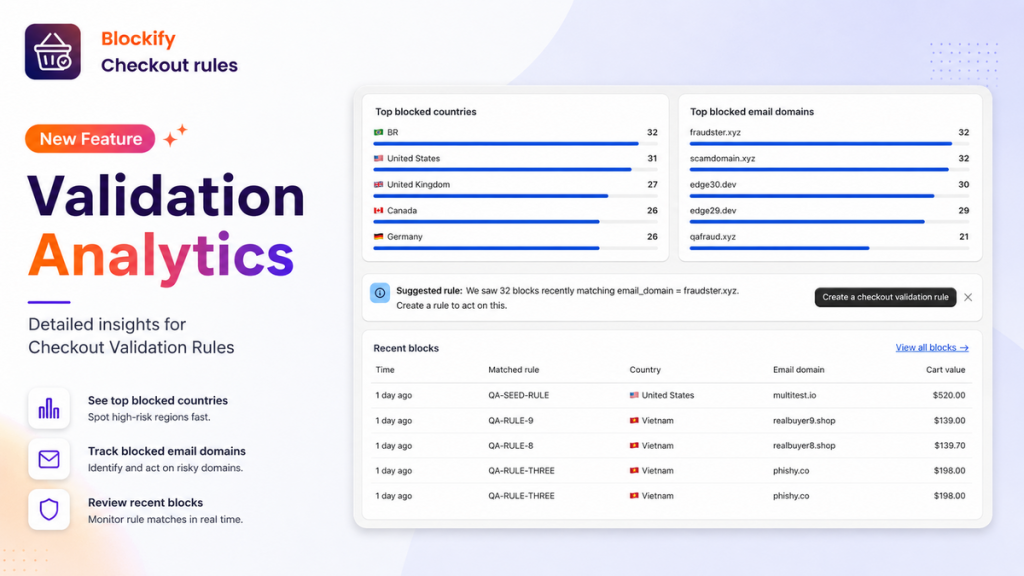
As a Shopify merchant, setting up checkout validation rules – like blocking risky email domains, restricted countries, or invalid order totals – is crucial for protecting your bottom line. But until today, you were left asking:
- Who is actually getting blocked?
- Is this rule saving me money or just annoying real shoppers?
- Are new patterns popping up that I’m missing?
We heard you loud and clear.
Today, we’re thrilled to roll out Validation Analytics – a massive upgrade to the Rules tab inside Blockify Checkout Analytics, designed to give you 100% visibility into blocked orders and automated protection suggestions.
What’s New in Blockify Checkout Rules?
Instead of a generic counter showing total blocks, you now get deep, actionable intelligence on every single interaction.
1. See Who and Where Your Rules Are Triggering
You no longer have to guess what’s happening under the hood. The updated Rules Tab now gives you granular breakdowns across four core dimensions:
- Location: Country-level blocking insights.
- Customer: Specific email groups and domains.
- Products: Which items or collections are triggering the most rules.
- Cart Value: Order thresholds catching blocks.
2. Track “Saved Revenue” in Real-Time
Every time a bad actor, fraudulent attempt, or policy-violating checkout is stopped, Blockify calculates the dollar value protected. See the exact dollar amount your rules have saved your store over time.
3. Granular “Block Details” Log
Say goodbye to high-level totals. Click into the brand-new Block Details screen to inspect an itemized, individual feed of every block that has occurred in your store – helping you audit performance and fine-tune conditions with confidence.
4. Smart Pattern Detection & 1-Click Rule Suggestions
The smartest update yet: Blockify now actively looks for repeat behavior across your checkouts.
If the app detects a sudden wave of attempts from the same email domain or a specific country, it will suggest a brand-new rule. Simply review the suggestion, click one button, and publish a rule with all conditions pre-filled.
Plan Availability & Access
Here is how Validation Analytics rolls out across Blockify plans:
| Feature | Basic, Premium & Plus | Free Plan |
|---|---|---|
| History Window | 2 Months of Historical Data | 50 Most Recent Blocks |
| Protected Revenue Insights | Full Access | ❌ |
| Deep Insights (Country/Email) | Full Access | ❌ |
| Automated Rule Suggestions | Full Access | ❌ |
Note: Upgrading from Free to Basic (or above) instantly unlocks full analytics insights, automated rule suggestions, and extended historical tracking.
How to Get Started in 3 Steps
Getting these insights takes less than a minute:
- Open your Shopify Admin and navigate to Blockify Checkout → Analytics.
- Click on the Rules tab in the top navigation bar. (If you haven’t enabled tracking yet, click Activate Analytics on the Overview screen).
- Review your Saved Revenue, dive into the Block Details, and accept any pending 1-Click Rule Suggestions!
Ready to protect your revenue with real data?
